Rendering pipeline & compositing
Rendering is how code becomes pixels. Senior frontend engineers do not stop at “the page is janky”; they can identify whether time is going into script, style recalculation, layout, paint, compositing, image decode, or GPU memory pressure.
Core details
Ordered pipeline: parse HTML/CSS → DOM/CSSOM → style recalculation → layout → paint → composite.
| Stage | Work | Typical trigger |
|---|---|---|
| Parse | Convert HTML/CSS bytes into DOM/CSSOM | Navigation, streamed HTML, new stylesheet |
| Style | Match selectors and compute values | Class changes, stylesheet changes, custom property changes |
| Layout | Calculate box geometry | DOM structure, size-affecting CSS, font changes |
| Paint | Rasterize text, backgrounds, borders, shadows, images | Visual changes that affect pixels |
| Composite | Merge layers into a final frame | Transform/opacity animation, layer promotion |
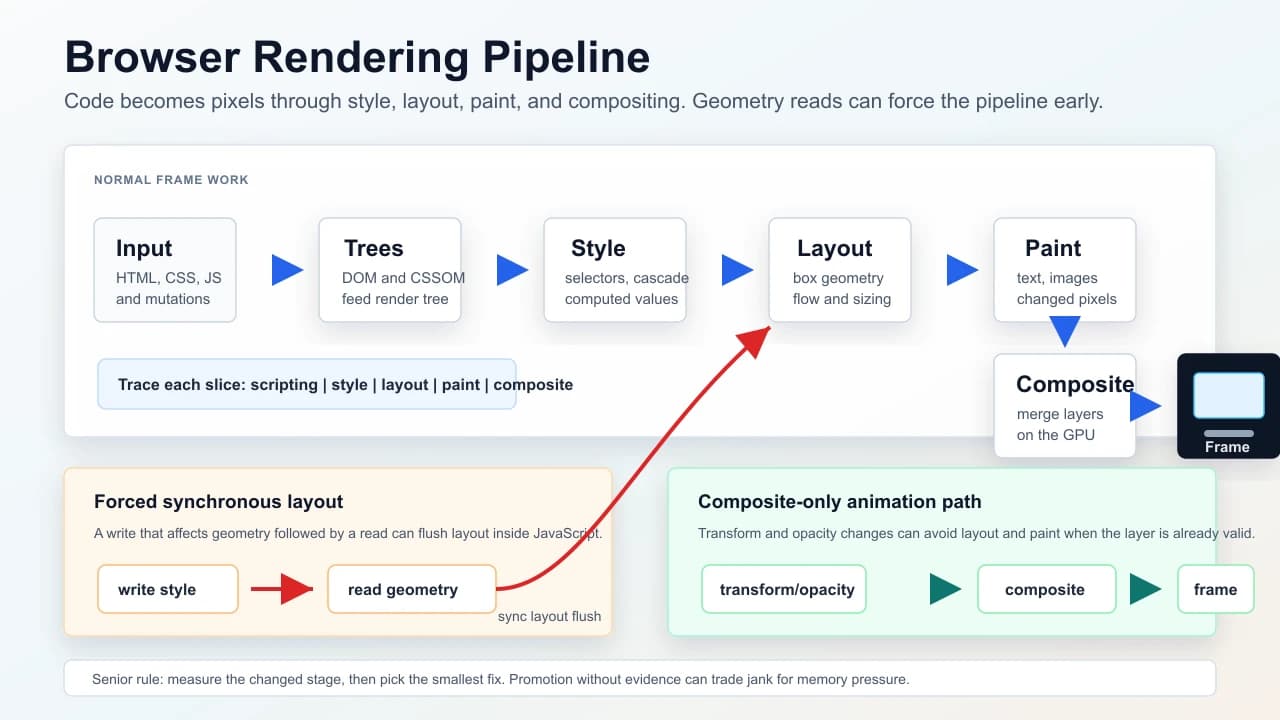
Tree vocabulary: DOM and CSSOM feed the render tree. Layout computes geometry. The browser may build a layer tree for independently composited surfaces.
Forced synchronous layout: if JavaScript writes layout-affecting styles and then reads geometry (getBoundingClientRect, offsetWidth, scrollTop) in the same loop, the browser may flush layout immediately to answer truthfully.
Layer promotion: transforms and opacity can often animate without repainting, but promoted layers consume GPU memory. will-change is a temporary hint, not a blanket optimization.
Diagnostics: use the Performance panel to separate scripting, style, layout, paint, and composite work. Use the Layers panel to verify actual promotion. Use screenshots/filmstrip to connect traces to user-visible symptoms.
Understanding
The browser batches work lazily until it must present a frame or answer a geometry question. Layout thrash breaks that batching by forcing the browser to make the world consistent during JavaScript execution.
Layout cost scales with the number of impacted boxes and the complexity of constraints. Paint cost scales with invalidated pixels and expensive effects such as filters, shadows, masks, and large backgrounds. Style recalculation grows with selector matching and dependency invalidation.
Compositing is a different kind of optimization. Moving an element to its own layer may avoid repainting during transform animation, but too many layers increase memory, upload cost, and mobile instability. A staff answer includes the rollback condition: remove promotion if it does not improve measured frames.
Practical examples
Batch reads and writes:
const rects = cards.map((card) => card.getBoundingClientRect());

requestAnimationFrame(() => {
  rects.forEach((rect, index) => {
    overlays[index].style.transform =
      `translate(${rect.left}px, ${rect.top}px)`;
  });
});
Choose properties by pipeline cost:
| Goal | Prefer | Be careful with |
|---|---|---|
| Move element visually | transform | top, left, changing layout flow |
| Fade element | opacity | animating visibility without state semantics |
| Expand content | reserved space, transform, or measured transition | height animation over large subtrees |
| Hide offscreen content | virtualization, content-visibility when appropriate | keeping thousands of nodes live |
Senior understanding
| Probe | Strong answer |
|---|---|
| Janky scroll | Separate input handler cost, layout, paint, and compositing in a trace |
“Use will-change?” | Explain temporary promotion, memory cost, and measurement |
| CSS-in-JS debate | Discuss critical CSS, runtime style insertion, and invalidation hotspots |
| CLS regression | Tie image/font/DOM mutations to layout stability, not just JS CPU |
Failure modes
- Reading layout after every DOM write in a loop.
- Animating layout-affecting properties on many nodes.
- Promoting many elements and causing GPU memory pressure.
- Loading fonts without fallback metrics, causing text reflow.
- Debugging React renders while the real issue is browser layout or paint.
Interview drill
Question: "A page scrolls smoothly on desktop but janks on mid-range Android. How do you debug it?"
Model answer structure:
- Reproduce with CPU/network throttling and record a Performance trace around the scroll.
- Separate scripting, style recalculation, layout, paint, and composite time.
- Check whether handlers block scrolling, layout is forced by read/write loops, or paint areas are too large.
- Apply the smallest measured fix: passive listeners, virtualization, read/write batching, cheaper paint effects, or limited layer promotion.
- Re-test the same trace and define a rollback condition if memory or paint gets worse.
Follow-ups to expect:
- "Why can
transformbe faster thantoporleft?" - "When does
will-changemake performance worse?" - "How would you prove the issue is paint rather than React rendering?"
Diagram
See also
Mark this page when you finish learning it.
Last updated on
Spotted something unclear or wrong on this page?