Main-thread scheduling & responsiveness
Responsiveness is the user’s proof that the page is alive. The browser can only handle input, run most JavaScript, update DOM, calculate layout, paint, and dispatch many events through a constrained main-thread budget. Senior frontend work treats that thread as a shared resource.
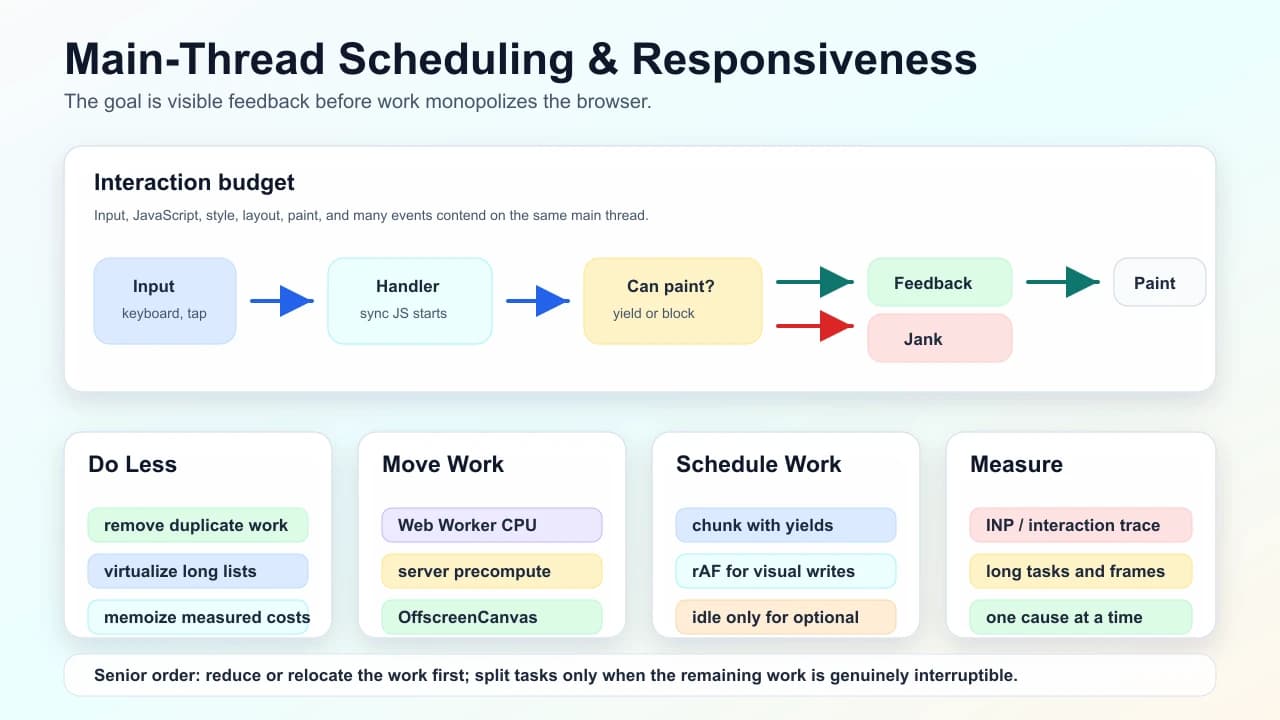
Core details
| Mechanism | Use it for | Avoid using it for |
|---|---|---|
requestAnimationFrame | Visual reads/writes before the next paint | Long CPU jobs that must finish regardless of frame timing |
setTimeout chunking | Cooperative breaks between CPU slices | Precise animation timing |
requestIdleCallback | Cache cleanup, low-priority precompute, analytics packaging | User-visible work or required business actions |
| Web Worker | CPU-heavy pure computation, parsing, compression, canvas support work | Direct DOM mutation |
scheduler.postTask-style APIs | Priority-aware task scheduling where available | Replacing measurement and architecture decisions |
Main-thread monopoly: DOM access, most event handlers, React commits, style/layout work, and many timers compete in the same place. A single unrelated feature flag can block typing if it creates long uninterrupted work.
Long tasks and INP thinking: users notice the delay from input to visible response. Treat long tasks, long animation frames, and poor Interaction to Next Paint as related symptoms: the page failed to yield and present feedback fast enough.
Event-loop shape: synchronous JavaScript runs to completion; microtasks drain before the browser can move on; rendering happens when the browser gets a chance. A large promise chain can starve rendering just as badly as a large click handler.
Profiler workflow: reproduce on a throttled profile, record a trace around the interaction, label scripting/layout/paint/network, then change one cause at a time. Do not guess from bundle size alone.
Understanding
Humans correlate interaction latency + motion smoothness, not averages. Burst CPU from unrelated feature flags can hijack responsiveness even if mean CPU looks fine. Scheduling is bargaining between latency (defer work), fairness (don’t starve animation), throughput (finish batch jobs). Yielding blindly can thrash caches—balance chunk sizes experimentally profiling.
Heavy layout/paint interplay often masquerades as “slow JS”; triage distinguishes orange scripting flame vs purple layout timelines.
There are three broad fixes:
- Do less work: remove duplicate renders, smaller data transforms, virtualize long lists, simplify selectors, avoid unnecessary hydration.
- Move work: push CPU-bound tasks to Workers, precompute on the server, cache normalized data, use OffscreenCanvas when graphics are the bottleneck.
- Schedule work: split non-urgent work into chunks and let the browser handle input and painting between slices.
The order matters. Scheduling a bad algorithm only makes it fail politely. A senior answer first reduces or relocates work, then adds scheduling where remaining work is genuinely interruptible.
Practical examples
async function processRows(rows: Row[]) {
  const batchSize = 250;

  for (let index = 0; index < rows.length; index += batchSize) {
    normalizeRows(rows.slice(index, index + batchSize));
    await new Promise((resolve) => setTimeout(resolve, 0));
  }
}
Chunking like this can keep input responsive during non-urgent work, but it is not a universal fix. If every chunk triggers layout or React state churn, you may create many smaller janks instead of one large one.
For visual work, batch layout reads before writes:
const boxes = items.map((item) => item.getBoundingClientRect());
requestAnimationFrame(() => {
  boxes.forEach((box, index) => {
    overlays[index].style.transform = `translate(${box.left}px, ${box.top}px)`;
  });
});
Senior understanding
Articulate bridging telemetry: field RUM long interaction vs lab synthetic reproducibility discrepancy. Mention interactionId timelines when discussing regression bisect—not only Lighthouse snapshot.
Escalation path: micro-optimization fails ⇒ architecture shifts (workers, simplifying render graphs, rewriting hot selectors—not deeper micro-patching loops).
Operational guard: performance budgets anchored to interaction-duration percentiles; optional synthetic CI traces when reproducible harness exists—call out flaky vs stable signals honestly.
Failure modes
- Doing expensive derived data work in render instead of memoized selectors or server-side preparation.
- Calling
setStatethousands of times in a loop instead of one batched update. - Measuring on a developer laptop only; missing low-end Android parse and CPU cost.
- Using
requestIdleCallbackfor work the user is waiting on. - Moving work to a Worker but sending huge cloned payloads across the boundary every frame.
Interview drill
Question: "Typing into search feels delayed after a new dashboard feature shipped. What do you do?"
Model answer structure:
- Define the symptom as interaction latency, then inspect INP/long-interaction telemetry by route and release.
- Reproduce with a throttled trace and mark the input event, handler, render, layout, and paint work.
- Look for long synchronous tasks, microtask starvation, wide React renders, expensive filtering, or layout after input.
- Prefer doing less work first: memoized selectors, server-side preparation, virtualization, smaller render trees.
- Move pure CPU work to a Worker or split interruptible work only after the workload is bounded.
Follow-ups to expect:
- "Why can a promise chain block rendering?"
- "When is chunking worse than one long task?"
- "What telemetry would you add before and after the fix?"
See also
Mark this page when you finish learning it.
Last updated on
Spotted something unclear or wrong on this page?