Docker images & containers for Node.js
Core details
Image = immutable filesystem + metadata; container = running instance from image + writable layer + cgroups limits.
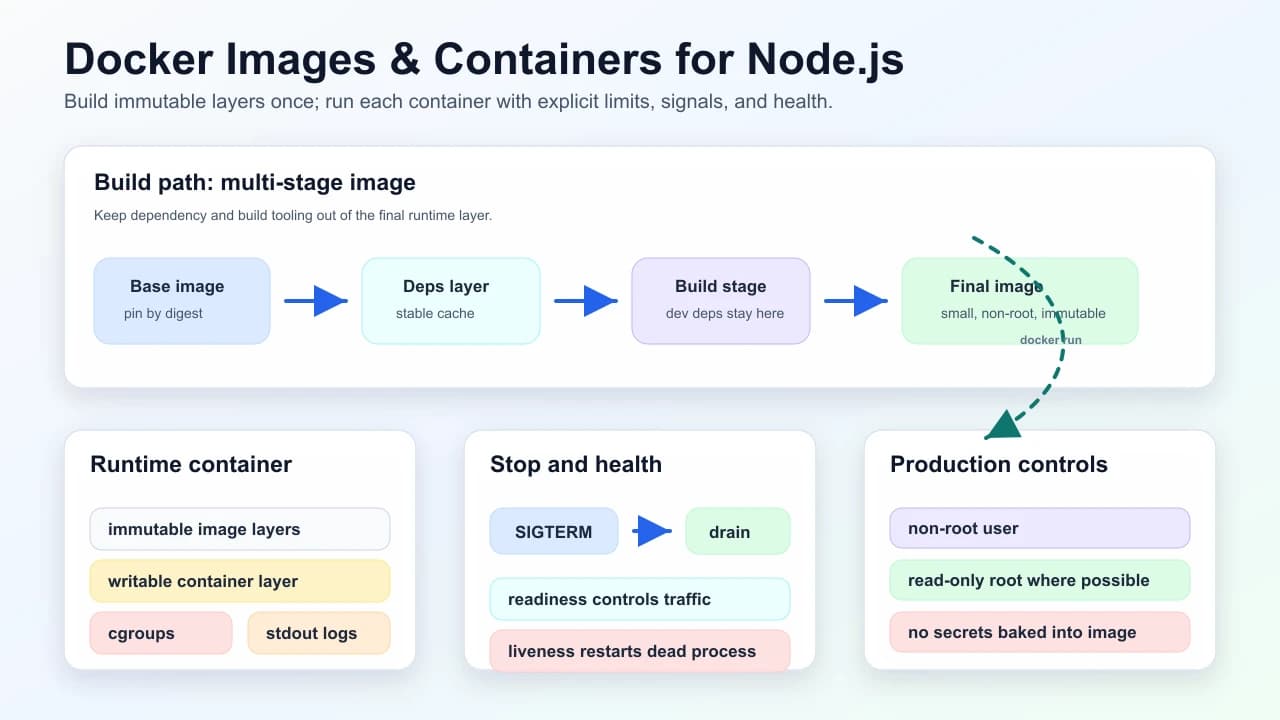
Problem this solves: package the Node runtime, app code, and OS dependencies into a repeatable artifact so production does not depend on a hand-built server.
Practices for Node services
| Practice | Why | Interview follow-up |
|---|---|---|
| Multi-stage build | tiny final image; dev deps don’t ship | What changes invalidate cache layers? |
NODE_ENV=production | leaner installs, behavior flags | How do you prevent dev-only packages from shipping? |
| Non-root USER | blast radius on escape | What filesystem paths still need write access? |
| dumb-init / init | PID 1 reaps zombies; signals reach Node | What happens on SIGTERM? |
| Read-only root where possible | reduce tamper surface | Where do temp files/logs go? |
.dockerignore | faster builds; no node_modules copy from host | What secrets might accidentally enter build context? |
Signals: container stop sends SIGTERM—shutdown hooks close server gracefully before SIGKILL.
Healthcheck: HTTP /health or TCP; distinct liveness vs readiness (Kubernetes split).
Understanding
Layer caching: order Dockerfile so dependency layers change less often than app code. Pin base images with digest for reproducibility.
The runtime contract matters as much as the image. A production Node container should:
- Start from config passed at runtime, not from baked-in environment secrets.
- Log to stdout/stderr so the platform collector owns persistence.
- Stop accepting new traffic before closing in-flight requests.
- Exit non-zero on unrecoverable startup failures.
- Expose a readiness endpoint that checks only dependencies required to serve this route class.
Practical Dockerfile shape
FROM node:22-alpine AS deps
WORKDIR /app
COPY package*.json ./
RUN npm ci

FROM deps AS build
COPY . .
RUN npm run build

FROM node:22-alpine AS runtime
WORKDIR /app
ENV NODE_ENV=production
COPY --from=build /app/package*.json ./
COPY --from=build /app/.next ./.next
COPY --from=build /app/public ./public
RUN npm ci --omit=dev
USER node
CMD ["node", "server.js"]
This is illustrative, not a universal Dockerfile. The important interview point is the separation of dependencies, build, and runtime, plus a small final image with no development toolchain.
Senior understanding
| Pitfall | Story |
|---|---|
| Fat images | slow pull → cold start on scale-out |
| Logging to file in container | use stdout for collector |
| Secrets in image | use runtime injection only |
| App is PID 1 without signal handling | deploys hang until SIGKILL; requests get cut mid-flight |
| Health check calls every dependency | dependency blip restarts healthy pods and amplifies outage |
Interview drill
Question: "A Node service in containers takes too long to roll out and sometimes drops requests during deploy. What do you inspect?"
Model answer structure:
- Image size and layer cache: base image, dependency layer order, dev dependencies, build context.
- Startup path: migrations at startup, connection pool warmup, config fetch, readiness delay.
- Stop path: SIGTERM handling, server close, keep-alive timeout, platform termination grace period.
- Health semantics: readiness removes from traffic; liveness only restarts truly stuck processes.
- Telemetry: deploy markers, 5xx during rollout, pod termination reasons, cold-start duration.
Follow-ups to expect:
- "Should readiness check the database?"
- "How do you rotate secrets without rebuilding the image?"
- "What changes if this runs on Lambda container images?"
See also
Mark this page when you finish learning it.
Last updated on
Spotted something unclear or wrong on this page?