State, SSR & hydration boundaries
State architecture is about one invariant: every value must have a clear owner. SSR and hydration make ownership visible because the same UI exists first as server output, then as an interactive client tree. If the two disagree, users see stale content, warnings, flicker, or broken interactions.
Core details
Ownership map:
| Slice | Persisted where | Hydration implication |
|---|---|---|
| URL | Routing | Shareable, deterministic server render |
| Server query cache | Server/data layer, optionally dehydrated | Duplication and drift risk |
| Server component data | RSC payload / framework cache | Client cannot mutate it directly |
| Local UI ephemeral | Browser memory | Must not collide with SSR HTML |
| Global store | Browser memory | Hydrate carefully; avoid two truths |
| Browser-only state | Storage, viewport, permissions | Gate behind client effect or stable placeholder |
Classic mismatch classes:
- Non-deterministic render:
Date.now(),Math.random(), generated IDs, request-order assumptions. - Environment globals:
window,document, storage, media queries, permissions, and viewport used during server render. - Double-fetch drift: server rendered one value, client fetch replaces it with another before the user understands what changed.
- Timezone/locale skew: server and browser format the same value differently.
- Invalid HTML: browser parser repairs markup differently from the framework’s expected tree.
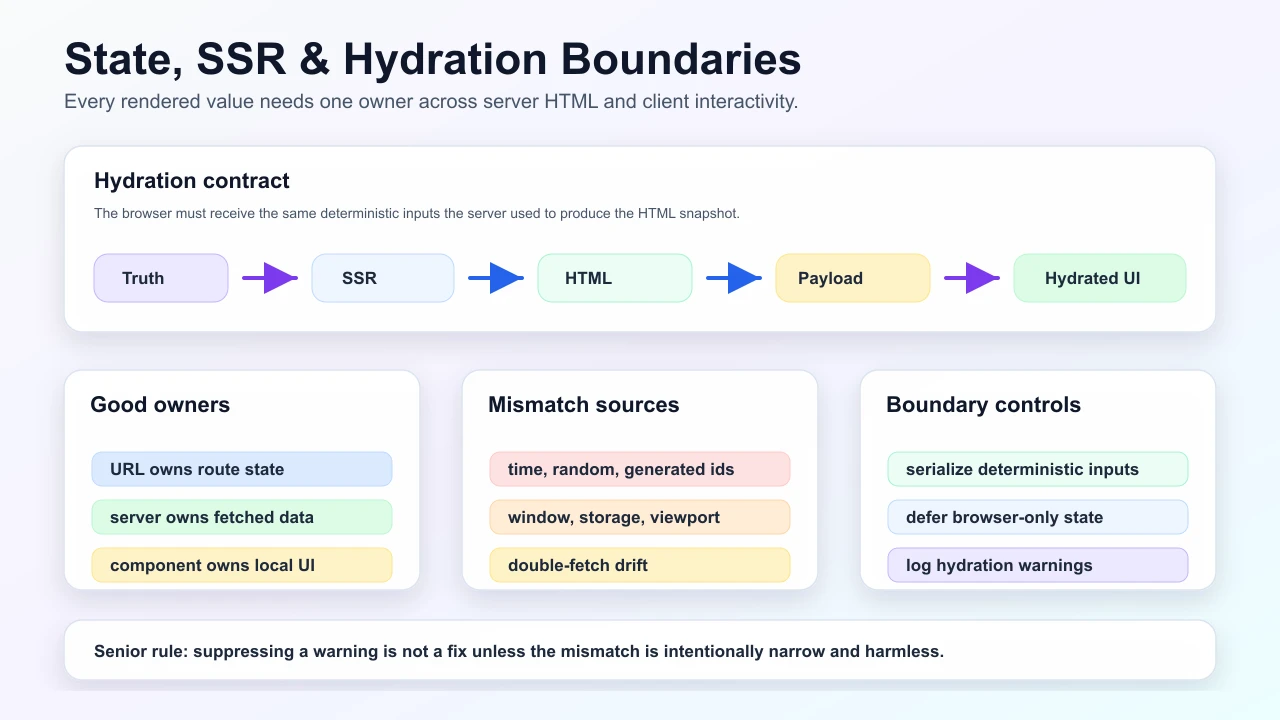
Boundary rule: server-rendered output must be deterministic for the serialized inputs the client receives. If a value depends on browser APIs, time, randomness, storage, permissions, or viewport, serialize it, defer it, or render a stable placeholder.
State reset rule: use component identity and keys deliberately. If /users/1 and /users/2 share the same component instance, local state can leak unless you reset it with a key or explicit transition path.
Streaming and partial SSR split the page into server-only and interactive regions. The benefit is earlier useful HTML; the cost is hydration strategy, fallback design, data serialization, and cache coordination.
Understanding
Hydration merges two worlds authored separately: a declarative SSR snapshot and an imperative client awakening. Divergence is not cosmetic. It means the server and browser used different inputs or different ownership rules.
SSR is not automatically faster. It improves first paint when HTML arrives early and useful, but it adds server work, serialization, hydration cost, cache complexity, and deploy-order constraints. A small CSR app can beat a poorly hydrated SSR app on real devices if the SSR app ships too much client JavaScript.
Streaming and Suspense shift the tradeoff. They let a stable shell arrive quickly while slower data resolves later. The shell must reserve dimensions, announce loading honestly, and avoid producing a layout shift when real content arrives.
Eliminating divergence often means narrowing the boundary surface: deterministic rendering, delaying client APIs, aligning serialization schema, and keeping only truly interactive subtrees on the client.
The visual model below frames hydration as a contract: server HTML and client hydration must share the same serialized truth, while browser-only values are deferred behind explicit boundaries and monitored with telemetry.
Practical examples
Avoid non-deterministic render:
// Bad: server and client can render different text.
function Timestamp() {
  return <span>{Date.now()}</span>;
}

// Better: pass the timestamp as serialized data.
function Timestamp({ issuedAt }: { issuedAt: string }) {
  return <time dateTime={issuedAt}>{issuedAt}</time>;
}
Guard browser-only APIs:
function ThemeStatus() {
  const [theme, setTheme] = useState<string | null>(null);

  useEffect(() => {
    setTheme(localStorage.getItem('theme') ?? 'system');
  }, []);

  return <span>{theme ?? 'Loading preference'}</span>;
}
Choose the right owner:
| State | Good owner | Why |
|---|---|---|
| Current tab in a local panel | Component state | Not shareable, not server-owned |
| Product id | URL segment/search param | Shareable and SSR-safe |
| User profile | Server data/query cache | Needs freshness and auth rules |
| Form draft | Form state or local storage | User owns unfinished edits |
| Feature flag | Server/edge config serialized to client | Must match render and analytics |
Senior understanding
| Probe | Strong answer |
|---|---|
| “Single layout shift acceptable?” | Tie answer to task severity, reserved dimensions, CLS budget, and user harm |
| “Progressive enhancement acceptable?” | Define what works without JS and what becomes richer after hydration |
| “Security concern?” | Minimize serialized sensitive fields; treat payloads as public to the browser |
| “Deploy risk?” | Treat serialized payload shape like an API migration |
Staff angle: coordinate deploy ordering when serialized shapes change. A new client reading an old payload, or an old client reading a new payload, should fail gracefully.
Operational angle: collect hydration warnings, client error-boundary events, and first-interaction failures in staging and production. Hydration bugs often appear only under real locale, extension, device, and network combinations.
Failure modes
- Copying server data into a client store and forgetting to invalidate one of them.
- Rendering locale, currency, or time differently on server and client.
- Hydrating a huge client island when only one button needs interactivity.
- Persisting sensitive server fields into serialized client state.
- Treating
suppressHydrationWarningas a fix instead of a narrow escape hatch.
Interview drill
Question: "A Next or SSR page logs hydration mismatches only for some users. What is your triage path?"
Model answer structure:
- Capture the exact warning, route, locale, timezone, user agent, release, and serialized payload version.
- Compare server HTML inputs with the first client render inputs before effects run.
- Search for nondeterminism: time, randomness, generated IDs, viewport, storage, permissions, locale, or invalid HTML.
- Decide the boundary fix: serialize the value, render a stable placeholder, defer browser-only state, or move less UI into the client island.
- Add telemetry and tests for the specific mismatch class, not a broad
suppressHydrationWarning.
Follow-ups to expect:
- "When is CSR simpler and better than SSR?"
- "What data is unsafe to serialize into the browser?"
- "How do streaming and Suspense change layout stability?"
Diagram
See also
Mark this page when you finish learning it.
Last updated on
Spotted something unclear or wrong on this page?